
OligoPool
PricingContactAbout
OligoPool

Free, professional tools for oligonucleotide design and analysis. Built for the molecular biology research community.

Contact OligoPool

Tools

  • Tm Calculator
  • GC Content Analyzer
  • Molecular Weight Calculator
  • Primer Analyzer
  • Batch Sequence QC
  • All 19 Tools

Guides

  • PCR Primer Design
  • Oligo Pool Synthesis
  • CRISPR Library Design
  • Melting Temperature
  • Oligo Quality Control
  • All Guides

Solutions

  • All Solutions
  • For Academic Labs
  • For Biotech
  • For Pharma R&D

Compare

  • vs IDT OligoAnalyzer
  • vs NEB Tm Calculator
  • Oligo Tool Suite
  • All Comparisons

Oligo Pools

  • Oligo Pool Design
  • How to Design
  • Vendor Decision

About

  • About Us
  • Contact
  • Pricing
  • Vendors
  • Resources
  • Privacy Policy
  • Terms of Service

© 2026 OligoPool.com. All rights reserved.

Partners:Oligo Pools
HomeResourcesCalculator WalkthroughsRun Oligo Pool QC

Pre-Order Oligo Pool QC Tutorial for Batch Sequence Checks

Use this page when you need to screen a large oligo pool before submission, decide whether GC spread, Tm variation, homopolymers, or secondary structures are severe enough to trigger redesign, and know which checks belong in a fast pre-order pass versus a deeper review. This workflow reports sequence-level screening results; it does not measure synthesized-pool representation or establish assay acceptance. If you already know the next action, open the Batch Sequence QC, Pre-Order Oligo Pool QC Guide, GC Content Analyzer, Tm Calculator, and What QC Should I Request for Oligos?.

Key Takeaways

  • •Screen GC content, Tm spread, sequence length, homopolymers, secondary structures, sequence complexity, and base composition before synthesis submission
  • •Use application-specific thresholds instead of a single universal pass/fail rule for every oligo pool
  • •Interpret sequence-level screens separately from measured post-synthesis representation and assay-specific acceptance criteria
  • •Flag homopolymers, low-complexity repeats, and strong predicted structures before vendor review or ordering
  • •Batch validation applies selected checks to rows; its flags are not measured synthesis outcomes
  • •For measured pool reports, metrics such as GC spread, Tm range, and coefficient of variation can add context that single-sequence checks cannot provide

Questions this guide answers

› Which QC thresholds matter before I submit a pool for synthesis?› How do I run Batch Sequence QC on 1,000+ sequences?› What does a QC review look like on a CRISPR library?› Which QC checks support sequence review and redesign decisions?

Useful follow-up checks

› Open Batch Sequence QC for a direct pre-order pass› Follow the full pre-order oligo pool QC guide› Check whether GC spread is driving pool imbalance› Compare Tm spread before finalizing the pool› Explore a fixed-assumption uniformity scenario› Review vendor QC requirements before ordering
Page contents
Which QC Checks Matter Before Ordering an Oligo Pool?How Do You Run Batch Sequence QC on a Large Sequence Set?What Does a QC Review Look Like on a CRISPR Library?Which QC Checks Support Review and Redesign Decisions?Frequently Asked Questions
Scientist in a cleanroom examining NGS flow cell and quality control metrics on a tablet

Which QC Checks Matter Before Ordering an Oligo Pool?

Pre-order sequence screening identifies properties for review; it does not prevent or predict experimental failures. Review each sequence and the design-level distribution against documented assay and supplier criteria. Evaluate measured pool representation separately after synthesis.

  • Selected sequence checks: Enable GC, Tm, secondary-structure, homopolymer, or low-complexity analysis as needed.
  • Design-level comparison: Review GC and Tm distributions, sequence length, and flagged rows against your design criteria; no universal pool threshold is asserted here.
  • Assay-specific compatibility: The tool does not validate supplier acceptance, biological function, or every multiplex interaction. Analyze a selected pair for cross-hybridization with Primer Analyzer)

Pre-Order Oligo Pool QC

Sequence Pool InputSelected sequence setBatch Sequence QC ToolRun selected sequence checksGC ContentOptional checkPer sequenceReview flagsTm AnalysisOptional checkCompare valuesCompare valuesHomopolymersDetect runsConfigured policyReview flags2° StructuresOptional analysisPer sequenceReview resultReview FlagsBy project criteria?Proceed to reviewExport for reviewProject criteria appliedReviseFlagged SequencesRequires actionRedesign & Re-QCTarget Metrics:No universal pass rate or acceptance thresholds are defined by this workflow

QC Overview: Input sequences → Select checks → Review flags against project criteria → Revise if appropriate → Export and retain the report

Common Pre-Order QC Metrics

GC Content Analysis (use GC Content Analyzer)

  • Review per-sequence GC values and distribution across the design.
  • Use assay-specific or validated design criteria for acceptance; no universal GC cutoff is asserted here.

Melting Temperature Validation (use Tm Calculator)

  • Use consistent reaction inputs and compare results with the relevant protocol.
  • The tool reports modeled Tm values and a batch-mean deviation flag; this is not a protocol-specific pass/fail decision.

Homopolymer Detection

  • The tool flags runs according to its implemented policy; the flag is not a supplier rejection criterion.
  • Check current product requirements and the sequence's functional role before revising a run.

Secondary Structure Analysis (use Secondary Structure Predictor)

  • When enabled, Batch QC runs per-sequence hairpin and self-dimer checks within the supported sequence-length range; it does not enumerate pairwise hetero-dimers across the pool.
  • Interpret predictions using the tool's stated conditions and risk policy, then follow the assay protocol for experimental decisions.

Sequence Complexity & Composition

  • The optional low-complexity check reports the tool's sequence-level findings; it does not screen arbitrary restriction sites, adapters, or assay-specific motifs.
  • Review sequence constraints against the construct design and current ordering specification.

Pool Uniformity Metrics (use Pool Uniformity Estimator)

Bioinformatics researcher analyzing GC content and Tm uniformity bell curves
  • Batch QC summary statistics describe the input sequences and enabled checks; they are not measured vendor or sequencing results.
  • Use post-synthesis data to assess representation, dropout, sequencing coverage, and error rates.

Quick Reference: Application-Specific QC Thresholds

There is no universal threshold table for these distinct assays. Apply the current protocol, design specification, and supplier constraints.

ParameterPCR PrimersqPCR ProbesCRISPR sgRNANGS AdaptersOligo Pools
GC compositionUse the assay design specification
Tm and reaction assumptionsUse the selected protocol and calculation conditions
Length and sequence constraintsCheck the design and current product tier
Homopolymers and low complexityReview tool findings against functional constraints
Secondary structuresInterpret model output under its stated conditions
Pool representation and dropoutUse measured post-synthesis QC data
Modifications, format, and compatibilityConfirm with the current supplier documentation or quote

Note: No application-wide numeric thresholds are asserted here. Confirm limits with the relevant protocol, validated design specification, and current product documentation.

How Do You Run Batch Sequence QC on a Large Sequence Set?

Prepare Your Sequences

Format sequences in FASTA format. Each sequence should have a header line starting with">" followed by an identifier, and one or more lines containing the nucleotide sequence.

Example FASTA format:
>sequence_001
ATCGATCGATCGATCGATCG
>sequence_002
GCTAGCTAGCTAGCTAGCTA
>sequence_003
ATATATATATATATATATAT

Ensure sequences contain only valid nucleotides (A, T, C, G for DNA; A, U, C, G for RNA). Remove any formatting characters, spaces, or ambiguous bases before QC.

Open the Batch QC Tool

Navigate to the Batch Sequence QC tool. This tool is specifically designed for comprehensive quality control of large sequence sets.

Input Sequences

Provide the sequence set using one of the formats accepted by the tool. Confirm file parsing and row identifiers before starting analysis.

  • Paste sequences or upload a supported text, FASTA, CSV, or TSV file.

The tool supports up to 1,000 sequences free per batch, or 50,000 sequences per batch with Tool Membership.

Choose Screening Checks

Choose the checks that match your review. The tool uses configured screening rules; it does not let you set application-specific GC, length, or homopolymer thresholds.

Set project criteria outside the tool

  • Use assay protocols, design specifications, and current supplier criteria to define acceptance.
  • Do not interpret a configured tool flag as a vendor rejection or experimental failure criterion.

Keep application checks separate

  • qPCR probe chemistry, CRISPR targeting and off-target review, and pool representation require workflow-specific checks beyond the selected Batch QC options.

Run QC Analysis

Start the run after selecting checks and, when relevant, reaction inputs. The selected options determine which analyses are performed:

  • Selected GC, Tm, homopolymer, and low-complexity checks run only when enabled.
  • Optional structure analysis checks each eligible sequence for hairpin and self-dimer risk; it does not enumerate all pool sequence pairs.
  • Each row receives pass/flag status and issue details for the checks that ran.
  • The summary reports counts, average length, processing time, and available result distributions.

Processing time depends on input size, selected analyses, and runtime conditions; no fixed completion time is promised.

Review Results
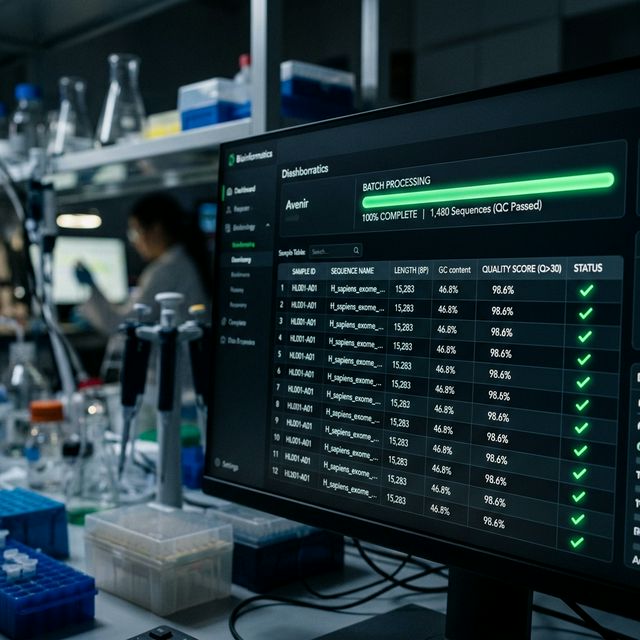
Bioinformatics dashboard showing batch QC results

The results panel displays:

Summary Statistics:

  • Total sequences analyzed
  • Pass and flagged row counts for the selected checks
  • Issue details for flagged rows
  • Available per-run summary statistics and distributions

Flagged Sequences:

  • List of sequences with one or more reported issues
  • Issue types and descriptions for the selected checks

Sequence-set summaries:

  • Selected sequence-property distributions describe the input, not measured synthesized-pool uniformity.

Resolve Flagged Sequences

For each flagged sequence, decide:

  • Compare the issue with documented design, assay, and supplier criteria.
  • Revise only when the sequence's required function allows it, then rerun the relevant checks.
  • Retain or exclude a sequence according to the project design; the flag alone does not decide this.

After revision, rerun the selected checks and retain the report with the design version. A clean run does not validate synthesis or assay performance.

Export Results

Export QC results as CSV for:

  • Documentation and record-keeping
  • Further analysis in Excel or R
  • Integration with synthesis orders
  • Tracking QC history

Export the reported input and QC findings for review. The report does not include measurements from synthesis or sequencing unless those data were separately analyzed.

How to Review a CRISPR-Related Sequence Set

Researcher examining a 384-well microplate with CRISPR-Cas9 molecular structure in background

Workflow considerations

Initial QC Review

  • Review the sequence ID and issue detail for every flagged row.
  • Batch QC does not assess guide targeting, off-target activity, promoter context, or guide function.
  • Use a CRISPR-specific design and validation workflow for those decisions.

Pool Uniformity Metrics

  • Review available input-sequence summaries and per-row findings.
  • Do not treat input summaries as measured pool uniformity or yield.
  • Obtain representation and dropout measurements from post-synthesis QC.

Review before changing a sequence

  1. Confirm a flagged position can be changed without altering the encoded target, spacer, barcode, or other required function.
  2. Use a relevant design tool or protocol to propose sequence changes; do not infer a safe substitution from a QC flag alone.
  3. Rerun the selected screen and retain the original and revised sequence versions.
  4. Validate biological function and pool representation with the appropriate downstream method.

After revision

  • Rerun the selected checks on the revised input.
  • Compare issue details against the same documented project criteria.
  • A pass does not validate CRISPR activity or synthesis performance.

Post-synthesis validation

  • Use measured representation, dropout, and sequence-accuracy results when available.
  • Apply assay-specific acceptance criteria and document the measurement method.

Evidence boundary: No customer case data or experimental outcome is presented here. Sequence screening, measured pool QC, and biological validation are separate steps.

Which QC Checks Support Review and Redesign Decisions?

Implement Iterative QC During Design

Run selected sequence checks when a design revision is ready for review. The tool accepts a finite batch per run; workflow cadence and batch size depend on design changes and the current product limits.

  • Consistent comparison: Keep selected checks and calculation inputs consistent across revisions when comparing reports.
  • Change records: Save the input version, enabled checks, and reason for each accepted sequence change.

Application-Specific Criteria

The tool's screening defaults are not vendor-validated acceptance limits. Set project criteria from the relevant protocol, design requirements, supplier specification, and measured validation data.

  • Confirm allowed lengths, composition constraints, modifications, order format, and included QC with the selected product tier.
  • For new workflows, use an appropriately designed validation study and define acceptance criteria before interpreting results.

Prioritize Pool Uniformity Over Individual Perfection

Sequence-property distributions can help identify design outliers, but they do not measure final pool representation or predict experimental success on their own. Review outliers in the context of sequence function and measured post-synthesis QC.

  • Measured pool QC: Use sequencing or supplier measurements to evaluate representation, dropout, and errors.
  • Scenario modeling: The Uniformity Estimator uses fixed illustrative assumptions and is not calibrated to the submitted sequence set.
  • Outlier review: Investigate unusual rows; do not remove or alter sequences solely to improve a summary statistic.

Comprehensive Documentation for Reproducibility

Maintain QC documentation for troubleshooting, internal review, and method validation. Essential records: original sequences, QC parameters/thresholds, flagged sequences, modifications, re-QC results, final sequences, synthesis order details.

  • Export formats: CSV from Batch QC, synthesis formats from Format Converter
  • Version control: Track QC iterations (v1, v2, v3) with timestamps and modification rationale
  • Quality-system review: For regulated work, confirm required records, signatures, and vendor documentation with your internal quality process

Integrated Multi-Tool QC Pass

Use each tool only for the decision it supports:

  1. Batch Sequence QC - run selected per-sequence checks.
  2. GC Content Analyzer - inspect GC composition using supported inputs.
  3. Tm Calculator - calculate Tm under entered assumptions.
  4. Secondary Structure Predictor - inspect a sequence or selected pair.
  5. Oligo Pool QC Metrics - interpret measured pool representation and QC data.
  6. Format Converter - clean FASTA, CSV, TSV, or plain sequence files before final vendor formatting
  7. Vendor Format Adapter - prepare provider-style review fields after QC and check the current vendor template

Use the QC metrics guide for measured data interpretation; obtain assay-specific thresholds from the protocol and current product documentation.

Define acceptance from project evidence

  • Define sequence-screen acceptance from the documented design criteria.
  • Define pool representation, dropout, and error acceptance from assay-specific validation and supplier QC.
  • Record measurement methods and denominators so QC summaries can be interpreted reproducibly.

Frequently Asked Questions

What is oligo pool QC and why is it important?▾

Pre-order sequence screening can surface design features for review, but it cannot verify synthesis outcomes or ensure experimental reproducibility. Requirements depend on the assay, construct design, synthesis service, and the measured QC evidence available for the pool.

  • Pre-order sequence screening: Review length, GC content, homopolymers, repeats, and predicted structures against the requirements of the intended design and protocol.
  • Measured pool QC: Use sequencing or vendor-reported measurements to assess representation, dropout, and errors; a sequence-only screen does not measure these outcomes.
  • Assay-specific interpretation: Treat Tm and structure predictions as review signals, not as standalone evidence that an assay will succeed or fail.
  • Project review: Pre-synthesis QC can document candidates for redesign, resynthesis, or deeper validation review
  • Quality documentation: Regulated or diagnostic workflows usually require documented validation outside this site, so keep QC exports with the project record and confirm requirements with your quality team

For multi-sequence inputs, use Batch Sequence QC to screen selected sequence properties before synthesis. See our full page on how to QC a large oligo pool before ordering.

What parameters should I check during QC?▾

Review sequence properties that matter to the design and assay. The available tools report only the checks described on their pages; they do not validate every property below automatically:

  • GC content (use GC Analyzer): Inspect each sequence and the distribution across the design; use an assay-specific protocol or validated design specification for acceptance.
  • Melting temperature (use Tm Calculator): Compare sequences using consistent calculation conditions, then follow the assay's protocol for primer compatibility.
  • Sequence length: Compare lengths with the assay design and supplier product requirements. The Batch QC tool reports length but does not impose an application-specific length acceptance rule.
  • Homopolymers: Flag runs for review against the synthesis service and assay requirements; this tutorial does not prescribe a universal run-length cutoff.
  • Secondary structures (use Structure Predictor): Review predicted hairpin and dimer results using the tool's stated conditions and shared risk bands; choose experimental conditions from the assay protocol.
  • Sequence complexity: Flag low-complexity and repetitive regions when relevant to the design; acceptable limits are application-specific.
  • Cross-reactivity (use Primer Analyzer): Check heterodimer formation in multiplex assays and review adapter/primer homology against the assay design

Batch Sequence QC runs the checks exposed by that tool; it does not perform every check listed here or establish assay acceptance. Use the QC metrics guide to distinguish sequence screening from measured pool QC. Clean source files with Format Converter, then use the Vendor Format Adapter for provider-style review fields.

How do I set appropriate QC thresholds?▾

There is no single threshold set that applies to every assay and synthesis route. Use the protocol, design specification, and current supplier requirements for your project. The examples below are not a substitute for those sources:

  • PCR primers: Follow the selected polymerase protocol and assay design requirements; use Primer Analyzer to inspect supported sequence properties.
  • qPCR probes and primers: Use assay-specific design guidance and probe chemistry documentation; sequence-only predictions do not model label chemistry or establish signal behavior.
  • CRISPR guide designs: Confirm construct format and screening requirements with the applicable design system and protocol; GC analysis alone does not assess guide activity or off-target effects.
  • NGS adapters and indexes: Follow the sequencer, library-kit, and demultiplexing requirements for the actual workflow.
  • Hybridization capture probes: Use the assay's capture-design and specificity criteria; no universal probe-length or uniqueness score is asserted here.
  • Pooled synthesis: Check the current supplier's supported sequence constraints and any project-specific representation or error requirements.

Synthesis and supplier checks:

  • Check the selected service's current length, pool-size, modification, format, purification, and QC options directly on its official product page or quote.
  • Do not infer synthesis chemistry, acceptance thresholds, or product compatibility from a broad platform label; confirm the actual product tier and specifications.

Batch QC tool runs its supported checks and applies the rules implemented by the application; these are not user-configurable or experimentally validated acceptance thresholds. See the Tm calculation tutorial for an explanation of the calculation inputs and model.

How many sequences can I QC at once?▾

Our Batch Sequence QC tool can process up to 1,000 sequences free per batch, or 50,000 sequences per batch with Tool Membership. For larger pools:

  • Split into batches: Use 1,000-sequence free batches or 50,000-sequence member batches
  • Sample first: QC a representative subset to identify common issues
  • Pre-filter: Remove obviously problematic sequences before QC

Processing time depends on:

  • Number of sequences
  • Average sequence length
  • Number of QC parameters checked
  • Server load

Completion time is environment-dependent; no fixed processing time is promised for either batch size.

What should I do with flagged sequences?▾

Flagged sequences require systematic remediation before synthesis. Decision tree approach:

  • Review each flag: Read the issue details and compare the condition with the sequence's role, assay protocol, and current supplier requirements. A flag is a review signal, not a failure probability.
  • Redesign strategies: Use synonymous codon substitution (protein-coding), silent mutations (non-coding), or position shift (if sequence location flexible)
  • Retain or exclude: Decide using the intended biological/design function and documented project criteria; the tool does not determine whether a sequence can be changed or excluded.
  • Documentation (export from Batch QC): CSV with original sequence, flags, modifications, and re-QC results for troubleshooting and internal review

Remediation strategies by flag type:

  • Composition: Consider GC changes only where the sequence function permits, then recheck with the GC Content Analyzer.
  • Tm: Compare sequences under the same reaction assumptions and the relevant assay protocol using the Tm Calculator.
  • Homopolymers and low complexity: Review the flagged sequence in its design context; do not apply substitutions that change a required motif or biological function.
  • Secondary structures: Inspect a flagged sequence with the Structure Predictor. Treat a prediction as a model result under stated conditions, not proof of experimental failure.

Iterative QC review:

  1. Initial QC with Batch Sequence QC
  2. Categorize flags by the tool's reported severity (high, medium, or low)
  3. Review high-severity rows and redesign only when project criteria allow it
  4. Re-run QC on modified sequences
  5. Iterate until the remaining flags are acceptable for the application and synthesis route
  6. Export final sequences in synthesis format

A rerun reports the selected checks on the revised input. It does not establish an expected pass rate, synthesis yield, or assay outcome. Keep the design rationale and the final criteria with the project record.

How do I ensure pool uniformity?▾

Sequence-level summaries describe the submitted design; they do not measure synthesized-pool representation or experimental reproducibility. Interpret them separately from post-synthesis QC:

  • GC distribution: Review the distribution and outliers in the intended sequence set with the GC Content Analyzer; use protocol or validated design criteria for acceptance.
  • Tm distribution: Compare values calculated with consistent inputs. The Batch QC Tm check flags deviation from the batch mean; it does not define assay-specific acceptance.
  • Length and composition: Compare reported lengths and composition with the design specification. Neither is a measurement of pool yield or representation.
  • Post-synthesis representation: Use measured sequencing or supplier QC data. The Uniformity Estimator is a fixed-assumption scenario model, not a prediction based on these sequence inputs.

Experimental validation approaches:

  • Sequencing-based QC: Define mapping, counting, and acceptance rules for the assay before interpreting representation, dropout, or error measurements.
  • Targeted amplification checks: Select targets and controls based on the assay design and validate the method; no universal sample count or ΔCq cutoff is asserted here.
  • Supplier QC: Request the metric definitions, measurement method, and included service tier from the current product documentation or quote.

Integrated QC review for uniformity:

  1. Batch Sequence QC - selected per-sequence checks
  2. GC Content Analyzer - distribution analysis
  3. Tm Calculator - calculate Tm for entered sequences under selected conditions
  4. Pool Uniformity Estimator - explore a fixed-assumption scenario model
  5. Error Rate Calculator - quality metrics

Set acceptance criteria from the assay validation, project specification, and supplier documentation. Sequence-only summaries cannot establish pool representation or acceptance. See the pool QC guide for a separate pre-order review workflow.

Related Oligo Pool QC Pages

Run the Full Pre-Order Oligo Pool QC Guide

Use the full guide when the decision spans design, validation, remediation, and synthesis ordering.

Analyze GC Content Across Oligo Pools

Review GC distribution, outliers, and uniformity signals before moving to Tm or structure checks.

Compare Tm Across a Pool Before Ordering

Review Tm calculations and inputs for the sequences you choose; this tutorial does not calculate an entire pool automatically.

How to Detect Secondary Structures

Review the supported hairpin and self-dimer checks before problematic rows reach synthesis submission; use a separate pairwise workflow for hetero-dimers.

Validate PCR Primer Pools Before Submission

Validate primer-pair readiness when pool QC narrows to PCR primer sequence risk.

QC a CRISPR sgRNA Library Before Synthesis

Move here when the pool is a CRISPR guide library and coverage, guide QC, and synthesis format all matter.

Lab-ready workflow

Turn this QC tutorial into a repeatable review pack

Use the QC checklist and Excel workbook to document batch screening, outlier decisions, and vendor-readiness before synthesis.

View the $39 QC pack

Open Batch Sequence QC

Process 1,000 sequences free or 50,000 sequences with Tool Membership using the checks and rules implemented in Batch Sequence QC. Review GC content, Tm spread, homopolymers, sequence complexity, and predicted structures before synthesis submission. Free runs do not require registration; member limits require an active license.

Run Batch Sequence QCView the Full QC Guide