PCR Primer Design Checklist for Tm, GC & Dimers
BeginnerWorkflow time varies by assay and review depth
Validate PCR primers after choosing a tool. Use this page when you already have a forward and reverse primer pair and need a pre-order decision: ready for ordering, needs gradient optimization, or should be redesigned. The checklist maps calculation tasks to the Tm Calculator, composition checks to the GC Content Analyzer, structure risk to the Secondary Structure Predictor, or the combined primer report to the Primer Analyzer.
By Kevin Luo, Bioinformatics Lead at OligoPool.com
Need the adjacent assay-specific page?
Stay here if the core job is to validate a standard primer pair. Switch to the qPCR or multiplex PCR guides if probe chemistry, fluorescence, or panel-wide compatibility is now the real bottleneck.
Pre-Order Decision Table
| Result | Interpretation | Recommended action |
|---|---|---|
| Ready for ordering review | The selected Tm, composition, and structure checks do not show a review signal under the documented assumptions. | Record the assumptions and confirm the assay protocol before ordering; use the Dilution Calculator only for later stock planning. |
| Optimize conditions review | A Tm, composition, or structure signal needs to be checked against the assay protocol, but the evidence does not by itself require a redesign. | Review the current protocol and, where it permits, plan a controlled optimization after checking matched buffer Tm. |
| Redesign primer candidate | Strong hairpins, cross-dimers, large Tm gaps, or composition outliers need review before the pair is carried into the assay. | Use Primer Analyzer for the combined report and compare candidate redesigns under the same assay assumptions. |
Quick Takeaways
- Primer validation works best as a sequence of checks: Tm first, then GC behavior, then structural risk.
- A pair can look acceptable in isolation and still fail if the Tm gap, GC extremes, or dimer risk is ignored.
- When multiple risk signals stack up, redesign is usually cleaner than carrying weak sequences into repeated troubleshooting rounds.
- If the real problem is probe chemistry or panel compatibility, switch guides early instead of forcing this page to answer everything.
Primer Review Signals and Threshold Context
These values are review prompts tied to the selected method or local tool policy. They are not universal assay acceptance thresholds or a guarantee that a PCR reaction will work.
Thermodynamic Parameters
| Tm (melting temperature) | Method and protocol dependent |
| ΔTm between primers | Compare under the same assumptions |
| Hairpin ΔG | Use the local structure-risk policy |
| Self-dimer ΔG | Use the local structure-risk policy |
| Hetero-dimer ΔG | Use the local structure-risk policy |
Sequence Composition
| Primer length | Use the selected design constraints |
| GC content | Screen composition and distribution |
| GC-clamp (3' end) | Method and target dependent |
| 3' complementarity | Review 3' complementarity in the tool |
| Ta (annealing temp) | Protocol-dependent starting estimate |
Dedicated Tools for Each Check:
Use this guide to decide the primer workflow; use the calculators when you need the actual Tm, GC, dimer, MW, or dilution value.
OligoPool Tm Calculator (Nearest-Neighbor)|Secondary Structure Predictor|GC Content Analyzer
Prerequisites
Required:
- Target DNA sequence (template)
- Desired amplicon size from the assay and readout plan
- PCR reaction conditions from the selected reagent protocol, including salt and Mg2+ assumptions
- Primer concentration from the validated assay protocol
Optional:
- Free account for saving calculation history in Dashboard
- Primer design software output (from Primer3, Primer-BLAST) to validate existing primers
Understanding the Thermodynamics
Tm Calculation Methods: Why Nearest-Neighbor is Superior
Different Tm calculators use different methods, producing varying results for the same primer. Our Tm Calculator uses the nearest-neighbor (NN) thermodynamic method for condition-aware estimates.
| Method | Formula / Approach | Interpretation | Context | Screening signal |
|---|---|---|---|---|
| Wallace Rule | Tm = 2(A+T) + 4(G+C) | Low; no universal bound | Short-sequence screening when its assumptions are acceptable | Composition-only signal |
| %GC Method | Empirical composition-based estimate; use only with its documented assumptions | Medium; condition-dependent | Use only when the method's documented assumptions match the assay question | Composition and condition signal |
| Nearest-Neighbor (NN) | Thermodynamic parameters for each dinucleotide step | Higher information content; still condition-dependent | Supported sequence and reaction inputs documented by the calculator | Condition-aware model output |
References: Wallace rule (Wallace & Itakura, 1979, DOI: 10.1093/nar/6.11.3543); %GC method (Rychlik & Rhoads, 1989); Nearest-Neighbor (SantaLucia, 1998, DOI: 10.1073/pnas.95.4.1460; Owczarzy et al., 2008, DOI: 10.1021/bi702363u)
Nearest-Neighbor Formula:
Tm = (ΔH° / (ΔS° + R × ln(C/4))) - 273.15 + salt_correction
where ΔH° = sum of enthalpy changes for each dinucleotide pair, ΔS° = sum of entropy changes, C = the disclosed oligo concentration, R = 1.987 cal/(mol·K), salt_correction accounts for Na+ and Mg2+ (Owczarzy et al., 2008)
Secondary Structure ΔG (Free Energy)
The Secondary Structure Predictor calculates Gibbs free energy (ΔG) under the selected temperature and salt conditions. More negative ΔG indicates a more stable structure in that model; use the assay protocol when deciding how to respond:
- Hairpin at or below -3 kcal/mol: Local review-band signal
- Dimer at or below -5 kcal/mol: Local review-band signal
- Value at or below -9 kcal/mol: Local high-risk classification
- 3' end pairing: Review separately in hetero-dimer results
Visual Guide: Secondary Structures to Check
Critical: concentrated 3' end complementarity can raise primer-dimer risk under some assay conditions. Check the pair-specific output using Secondary Structure Predictor in hetero-dimer mode.
Salt Correction for Tm (Vendor-Specific Buffers)
Ionic strength significantly affects DNA duplex stability and Tm. Our Tm Calculator selects the documented Owczarzy 2004 monovalent or 2008 magnesium branch from Na+, Mg2+, and dNTP inputs.
Protocol inputs to record
- Selected polymerase and buffer product, including the current protocol version
- Reported monovalent ions, Mg²⁺, dNTP, primer concentration, additives, and reaction volume
- Any vendor-specific annealing guidance that is separate from the Tm calculation
Do not substitute a generic buffer table for the current manufacturer protocol. The calculator accepts disclosed numeric inputs; it does not model a polymerase or buffer family.
Calculator settings recommendation
When using vendor buffers, set your Tm Calculator to match:
- Any polymerase: Enter only the current protocol's disclosed numeric assumptions
- Unreported buffer components: Record them as unknown rather than inferring a salt value
- Custom buffer: Confirm how the protocol defines effective ion conditions before entering them
Annealing plan: Use the selected enzyme protocol and an assay-specific optimization plan.
Tool selection note
Always use matching documented conditions across calculations. Enter the selected buffer assumptions in the Tm Calculator and record them with the structure review.
Primer Validation Process
1
Design Initial Primers
Use your favorite primer design software (Primer3, NCBI Primer-BLAST, etc.) or design manually. You can also use our Oligo Properties Calculator to get a quick overview of basic primer characteristics.
Basic Primer Design Guidelines:
- Length: Apply the selected design tool and assay constraints - verify with Oligo Properties Calculator
- GC Content: Screen composition and distribution with the GC Content Analyzer
- Tm Target: Compare primers under the same documented method and protocol with the Tm Calculator
- 3' End: Review complementarity and target context with the selected design method
- Avoid: Repeats, homopolymers, and palindromes when the selected assay or protocol flags them
Example primers for this walkthrough:
>Forward_Primer
ATCGATCGATCGATCGATCG
>Reverse_Primer
GCTAGCTAGCTAGCTAGCTA
Copy these example sequences and paste into Tm Calculator batch mode to follow along with the validation steps.
2
Calculate Melting Temperatures
Use the Tm Calculator to verify that your primers have appropriate and similar melting temperatures. For a deeper understanding of Tm method differences and interpretation errors, see our comprehensive Tm calculation tutorial.
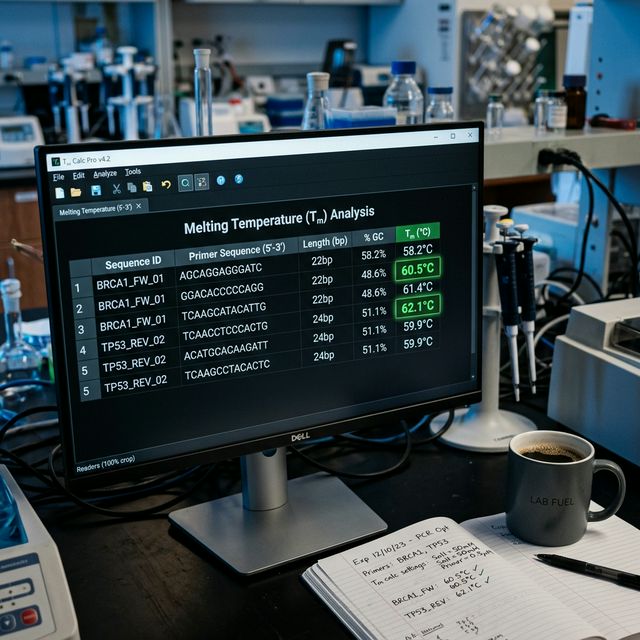
Tool settings:
- Method: Select the model required by the assay or protocol
- Salt and Mg2+: Enter the current protocol's disclosed ionic conditions
- Oligo concentration: Use the concentration defined by the assay setup
Instructions:
- Go to Tm Calculator
- Switch to "Batch Mode" (top of page)
- Paste both primers (one per line) or upload FASTA file
- Set reaction conditions (salt concentrations)
- Click "Calculate Tm"
What to look for:
- Tm Range: Compare both primers under one documented method and protocol
- Tm Difference: Interpret the pair difference with the assay protocol; no universal cutoff is asserted
- Annealing Temperature: Use a protocol-dependent starting estimate based on the lower Tm, then optimize with enzyme guidance or a gradient
Common issues
- Unexpected Tm: Recheck sequence, units, concentration, salt, and model assumptions
- Large pair difference: Review the design method and consider redesign under the assay protocol
3
Analyze GC Content
Use the GC Content Analyzer to check for balanced base composition. Open the GC content walkthrough when primer sets need a distribution check.
Instructions:
- Go to GC Content Analyzer
- Use "Batch Mode" and paste both primers
- Click "Analyze GC Content"
- Review the GC% for each primer
Interpretation prompts:
- GC Content: Compare composition and distribution with the selected design method
- Avoid: Treating a universal GC pass/fail band as an assay acceptance rule
- Distribution: GC bases should be evenly distributed (not clustered)
Important: Warning Signs:
- Composition outlier: Review binding, specificity, and structure in the assay context
- GC clustering: Check for structure and protocol-specific amplification concerns
- 3' end: Apply the selected design method's complementarity guidance
4
Check Secondary Structures
Use the Secondary Structure Predictor to detect hairpins, self-dimers, and cross-dimers. For detailed guidance on interpreting secondary structure predictions, see our secondary structure detection tutorial.

Instructions:
- Go to Secondary Structure Predictor
- For self-interactions: Analyze each primer individually (hairpins, self-dimers)
- For cross-interactions: Select"Hetero-dimer" mode and test Forward vs. Reverse
- Review ΔG values (free energy) for each structure
Acceptable structures:
- Hairpins: Interpret the predicted band with the local structure-risk policy
- Self-dimers: Interpret the predicted band with the local structure-risk policy
- Hetero-dimers: Review pair-specific and 3' end context
- 3' End Complementarity: Use the tool output and assay-specific decision rule
These labels are screening guidance from the local tool policy, not universal acceptance thresholds. Confirm assay-specific criteria with the selected protocol.
Important: Problematic Structures:
- Strong hairpins: Escalate for review or redesign when the local policy and assay context flag the structure
- Strong dimers: Escalate pair-specific 3' interactions for review
- 3' complementarity: Treat concentrated 3' pairing as a risk signal, not a universal cutoff
5
Evaluate and Decide
Review all results and make a decision: proceed with synthesis, or redesign primers.
Decision Matrix:
| Parameter | Ideal | Acceptable | Redesign Needed |
|---|---|---|---|
| Tm | Protocol-defined | Compare under matched assumptions | Recheck inputs or redesign if the assay flags a mismatch |
| Tm Difference | Study-specific | Compare with protocol guidance | Escalate for redesign review |
| GC Content | Study-specific | Review composition distribution | Escalate composition outliers |
| Hairpin ΔG | Local policy band | Review predicted risk | Escalate with assay evidence |
| Dimer ΔG | Local policy band | Review pair-specific risk | Escalate with assay evidence |
Optimization note
If one parameter is slightly out of range but others are excellent, primers may still work. Always test with gradient PCR (test multiple annealing temperatures) to optimize empirically.
Final Pre-Order Validation Checklist
Complete this checklist before ordering primers. Use it as a risk review, not as a guarantee that a PCR assay will work.
Sequence Quality
Thermodynamic Parameters (from Tm Calculator)
Base Composition (from GC Analyzer)
Secondary Structures (from Structure Predictor)
Decision guide:
All checks pass
Continue to protocol and supplier review with the recorded evidence.
1-2 checks fail (non-critical)
Review each signal against the assay and decide whether to test or redesign.
3+ checks fail or critical fail
Escalate the stacked signals for assay-specific redesign or validation.
Save this checklist and your calculation results to Dashboard for documentation and future reference.
6
Order and Test
Once validated, order your primers from a synthesis vendor and test in PCR.
Ordering and test plan:
- Select purification and scale from the supplier quote and assay requirements
- Start with the calculated, protocol-dependent annealing estimate and compare it with enzyme guidance
- Use a protocol-defined gradient or optimization plan when the first condition is inconclusive
- Save calculation results to your Dashboard for future reference
Optional: Calculate Concentrations
After receiving primers, use these tools:
- Molecular Weight Calculator - Calculate MW and extinction coefficient
- Dilution Calculator - Prepare working stocks and reaction mixes
Troubleshooting Common PCR Issues

Problem: No PCR Product
Primer design-related causes and solutions:
Cause 1: Annealing temperature too high
Diagnosis: Primers can't bind to template at set Ta
Solution: Re-calculate Tm with Tm Calculator using the current protocol's disclosed conditions, then follow the enzyme-specific annealing guidance or optimization plan.
Note: polymerase-specific annealing guidance must come from the current product protocol.
Cause 2: Strong secondary structures
Diagnosis: Use Secondary Structure Predictor and review the local risk band, selected temperature, and 3' end context
Solution: Escalate a flagged structure for assay-specific redesign or validation; the local band is not a universal pass/fail rule.
Cause 3: Primer-dimers consuming primers
Diagnosis: Review the observed gel pattern, controls, and pair-specific hetero-dimer output together
Solution: Check 3' complementarity with structure predictor. Use the assay criteria and observed evidence to decide whether to redesign.
Problem: Non-Specific Products
Multiple bands or smearing on gel:
Cause 1: Annealing temperature too low
Solution: Adjust Ta in small, protocol-defined increments. Treat any fixed offset from Tm as a starting heuristic; enzyme protocol and gradient results should determine the final Ta.
Cause 2: Low primer specificity
Diagnosis: Compare sequence composition, length, specificity evidence, and Tm assumptions with the selected design method
Solution: Redesign or re-screen only where the assay and design method identify a specific issue; do not apply universal length, GC, or Tm targets.
Cause 3: Template contamination or complexity
Solution: Follow the selected assay and reagent protocol for contamination, cycling, and additive checks; record any change and validate it experimentally.
Problem: Primer-Dimer Artifacts
Small products competing with target amplification:
Immediate fixes (without redesign):
- Check whether the selected protocol includes a hot-start or other setup control
- Review primer concentration against the validated assay protocol; use the Dilution Calculator for arithmetic
- Use the protocol-defined annealing optimization plan
- Recheck the pair-specific structure result before changing the design
Long-term solution (primer redesign):
Check hetero-dimer formation with Secondary Structure Predictor:
- Review the hetero-dimer result using the local policy bands and assay context
- Escalate concentrated 3' complementarity for redesign review
- Check repeated complementarity alongside the observed controls and product pattern
Advanced: Enzyme-Specific Considerations
Polymerase choice: Use the selected product protocol for buffer, mismatch, cycling, and annealing guidance.
Product-specific conditions: High-fidelity and other polymerases expose different buffer and cycling instructions. Recalculate Tm only from disclosed numeric inputs in the selected protocol.
Hot-start options: Treat setup chemistry and hot-start behavior as protocol-dependent controls, not universal remedies.
Validation Summary
1
Design & Calculate
Use Tm Calculator to verify melting temperatures match your PCR conditions
2
Validate Composition
Check GC content and identify sequences with extreme base composition
3
Screen Structures
Predict secondary structures and eliminate problematic primer interactions